
Overview
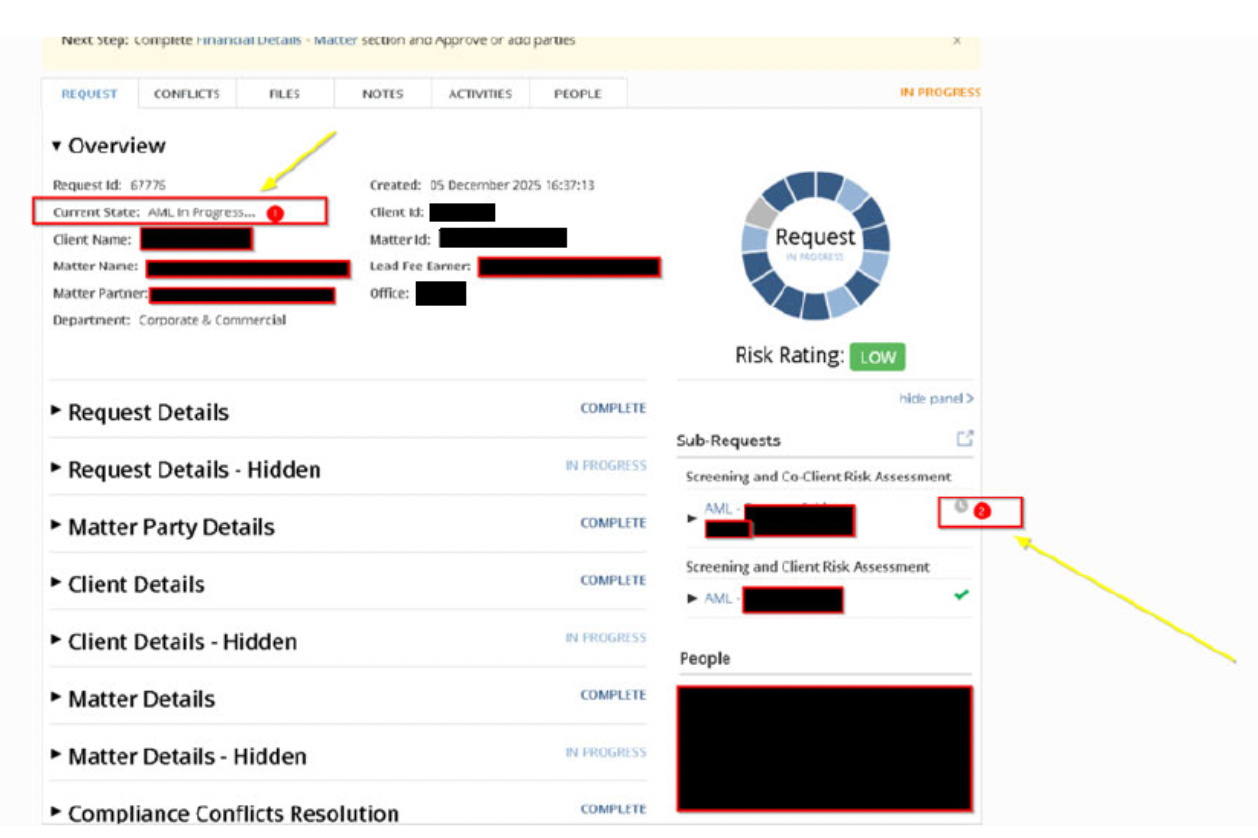
If a user cannot edit the Financial Details section within a Client/Matter Intake (CMI) Request and the section appears greyed out, the Request is currently in the system state “AML in Progress…”. This behaviour is expected and prevents users from advancing the Request prematurely.
Why This Happens
When a Request is in AML in Progress…, the system is awaiting the completion of an associated AML check.
This state is controlled by an automated integration, which means:
- The Request must not be edited or advanced at this stage.
- The Financial Details section and other later steps remain locked.
- A clock icon appears next to the AML section, indicating that the process is still ongoing.
Once the AML step finishes, the Request will automatically move forward.
How to Resolve
Users do not need to take action.
The Financial Details section will become editable when:
- The AML integration is complete.
- The system automatically transitions the Request into the next workflow state.
- All relevant sections unlock and can be completed normally.
If the status remains unchanged for an unusually long time, contact your support or system administrator to review the AML integration logs.
What Users Should Do
✔ Wait for the AML process to complete.
✔ Check for the workflow state change before attempting edits.
✘ Do not try to bypass or manually progress the Request.
✘ Do not edit Financial Details while the AML step is active.
When to Contact Support
Raise a support ticket if:
- The Request remains in AML in Progress… longer than expected.
- The AML integration appears stalled or has not returned a result.
- Other Request sections are unexpectedly locked.